Configuring P2P on FUNC
This guide details how to configure Peer-to-peer (P2P) networking when using the FUNC node controller.
Configuring P2P on your node
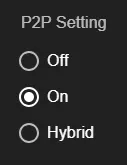
Section titled “Configuring P2P on your node”There are three different P2P configuration modes:
P2P Mode: OFF (Default)
Section titled “P2P Mode: OFF (Default)”P2P networking is disabled and your node will only connect to Permissioned Repeaters.
Why choose this mode?
Section titled “Why choose this mode?”Choose this mode if you have strict bandwidth constraints.
How to configure
Section titled “How to configure”Assuming FUNC is already installed, open the FUNC app, click Manage->Configure, and ensure both checkboxes are toggled off:

P2P Mode: HYBRID (Recommended)
Section titled “P2P Mode: HYBRID (Recommended)”P2P networking is enabled and your node will connect to both Permissionless Repeaters and Permissioned Repeaters.
Why choose this mode?
Section titled “Why choose this mode?”Choose this mode if you have flexible bandwidth constraints. This mode will also result in the greatest resiliency by connecting to both P2P and non-P2P networks.
How to configure
Section titled “How to configure”Assuming FUNC is already installed, open the FUNC app, click Manage->Configure, and ensure the “Enable P2P Hybrid Mode” checkbox is toggled on:

P2P Mode: ON
Section titled “P2P Mode: ON”P2P networking is enabled and your node will connect to only Permissionless Repeaters and validators.
Why choose this mode?
Section titled “Why choose this mode?”Choose this mode if you have very high bandwidth constraints and are able to closely monitor your usage.
How to configure
Section titled “How to configure”Assuming FUNC is already installed, open the FUNC app, click Manage->Configure, and ensure the “Enable P2P Mode” checkbox is toggled on: